agile
[Test] 如何讓你的自動化測試結果被團隊看見 - How to Make Your Test Automation Efforts Visible to Everyone on the Team
凌晨2:16如何讓自己的自動化測試結果被團隊看見
最近讀到一篇文章在討論 如何讓你的自動化測試結果被團隊看見 (How to Make Your Test Automation Efforts Visible to Everyone on the Team), 覺得蠻有趣的, 所以來寫篇心得吧 :)
 文章裡面提到許多的論點, 都能夠引起自己心裡的共鳴. 在作者的專案中, 他覺得自己的測試和自動化測試很不容易被團隊發現, 似乎沒有人在意測試結果這件事,
 直到要出版的前一刻才會被重視. 然後突然間, 整個團隊中的成員就會開始討論, 為什麼這些需求沒有 PASS? 為什麼有些需求沒有被驗證到?
更很有趣的是作者也發現不是只有他一個人有這種感覺 (謎之音 : 應該是幹過 QA 的人都知道這檔事). 事實上, 作者在 webinar 也上面發問過一個問題 : 'How visible are your current testing and automation efforts to everyone in the organization? (你現在的組織內有多少人在做測試及自動化的工作?) 有趣的結論是 :
43.5% answered “Somewhat visible.”
26.5% answered “Not very visible.”

直到要出版的前一刻才會被重視. 然後突然間, 整個團隊中的成員就會開始討論, 為什麼這些需求沒有 PASS? 為什麼有些需求沒有被驗證到?作者認為這個數字應該可以在更高才對, 所以他在新的 Agile 專案中, 特別注意下列這些的部分 : Planning, Writing 和 Execution.
1. Planning

在早期的年代中, 自動化測試並不是那麼地被重視. 所以, 第一件事是必須要讓你的自動化測試工作達到你Manager 的預期. 這是非常關鍵的一件事, 因為如果你不讓他知道, 他們往往不知道自動化測試是需要投入開發的成本, 這不是像阿拉丁神燈一樣許願就能夠完成 (it’s not simply a “one and done” effort), 且測試案例是需要被維護的.
如果你不維護測試, 這將會變成你的夢靨. 因為 Managers 可能會預期自動化測試的案例要高達 90%, 這取決於你是否能夠 push 他們或者教育他們說這是很一件很難達到的事.
Managers 也需要知道測試自動化會是團隊每個成員的責任, 而不是像過去一樣只有單一 tester 來完成的事. 可參考這個 Link http://www.joecolantonio.com/2015/09/22/5-things-your-boss-doesnt-understand-about-test-automation/
開發的成本, 這不是像阿拉丁神燈一樣許願就能夠完成 (it’s not simply a “one and done” effort), 且測試案例是需要被維護的.Staffing and Skills
現在軟體開發的趨勢也漸漸專注於客戶導向 (customer-driven development models), 所以自動化測試也比過去更需要被重視. 其中, Agile 和 DevOps 更是需要自動化的輔助, 例如持續整合和發佈 (Continuous intergration and delivery) 就必須仰賴自動化測試來串接, 使開發流程更加快速及流暢.
作者更進一步地強調, 在他過去的經驗中, 開發人員往往多於測試人員 (謎之音 : 好像大家都是這樣的組織架構), 所以開發人員也被要求對產品的測試自動化負責, 而每一個團隊的成員也須依照自己能力來做測試的工作, 並且在一個 Sprint 中被 Planning 及 Control.
如果一個測試人員只負責開測試案例, 這反而會降低整體開發的速度. 雖然分別對不同的開發人員的產出做測試會加速開發, 但更重要的是讓你的測試策略更明確地被團隊看見. 作者提到一個方法能夠降低開發者跟測試人員的 gap, 就是透過 BDD (Behavior-Driven Development) 的方法.
Use TDD and BDD
假如看過許多導入 Agile 來做開發的公司, 大部分的公司都會提到 TDD, BDD 或者是 Red-Green-Refactor. 你一定會問說, 這是三小?? TDD (Test-Driven Development) 簡單的來說就是在你寫程式之前先設計你的測試. 在每次 commit code 的時候都要在這個 eco-system 裡面先通過這些測試. TDD 的好處是讓每個 developer 在寫 code 以前就被預見自己會產生的 defect. 所以你不用再等到 QA 花了一天測試後才告訴你結果. (謎之音 : 世界真是美好)
當 TDD 開始被重視並實現時, BDD 就是一個以使用者 (As a User) 觀點來做實現的測試了. 基本上, 你用寫 Story 的方式來寫測試, 這樣會使你的測試更專注於使用者需要的是什麼. 如果你今天是與一個跨國的團隊合作, 溝通會是你最大的障礙及耗費成本的一件事. 若是使用 BDD 裡面所提倡可執行化的文件 (executable specifications) 來成為團隊裡面協同合作的工具, 無形間會降低團隊的溝通成本, 且也能有更好的合作.
Make your automation efforts part of the DoR and DoD
一個團隊的 DoR (Definition of Ready) 是根據團隊何時將 backlog 中的工作拿到現在的 sprint 中, 這會成為團隊對於這個 story 的確認清單 (Checklist). 如果使用 DoR, 團隊成員要很明確地說出這個 story 如何被執行及實作. 如果不能產出一個合適的測試案例或者是不明確的驗收標準 (如不清楚這個功能 Pass 或 Fail 的標準), 表示這個 story 根本沒有被定義清楚且必須被退回去.
而另一個確認清單會是 DoD (Definition of Done), 在 Sprint Review 的時候, 每個團隊成員都要很明確的明白這個 story 被關閉的驗收標準. DoD 需要包含 測試類型, 測試涵蓋率 (Test Coverage) 和定義測試的條件. DoD 可以增加產品品質的能見度及滿足客戶的需求. (The DoD adds visibility to your product’s quality and customer satisfaction.)
當你是 Scrum Team 的一員, 你所定義的 ‘Done’ 就必須將自動化測試包含在 story 中. 舉例來說, 如果一個 developer 要改 login page, 他就有責任要去改 test framework 中的 page object. 所以你看自動化測試多重要 :)
2. Write Test Phase
Test Mix
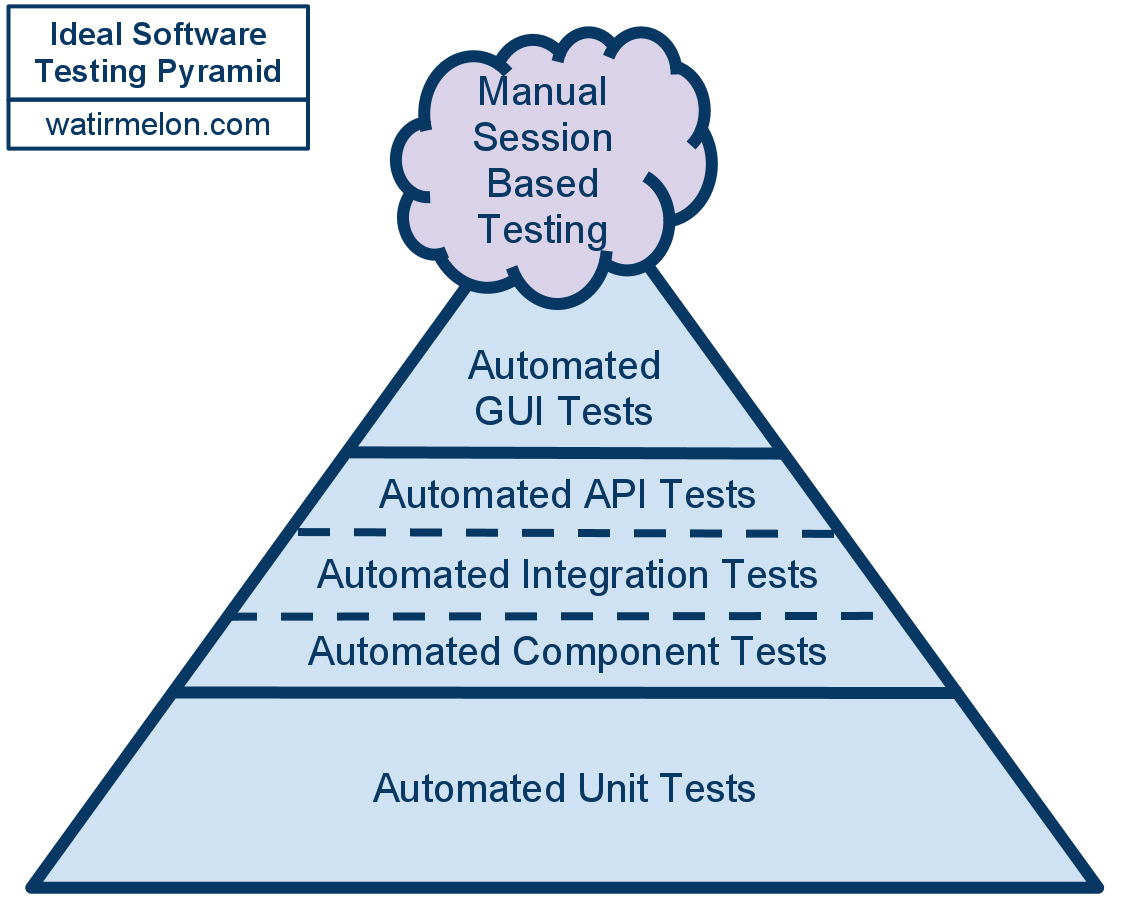
測試的金字塔 (Testing Pyramid) 可以幫助我們看出測試案例類型的分佈. 單元測試在金字塔中佔了大多數, 並且是所有測試很重要的基礎. 所以寫單元測試是很划算的一件事 (bang for the buck), 因為它能夠跟你的程式一起完成, 並且很容易地在你的開發過程中被加入.
在這個金字塔的中間是整合測試, 它雖然小但卻也是最花成本的, 然而它確可以測到你系統的每個部分. GUI 的測試, 在金字塔的頂端, 以圖來說它也會是佔你的測試案例中的極小部分.
坦白來說, 這個金字塔常常會誤導我們. 作者甚至認為這個金字塔常常會把人們帶往錯誤的方向 (我也是這麼覺得), 作者提出兩個論點, 第一個是這個金字塔根本無視市場的風險, 所以要整個降低風險, 最好的方法就是執行金字塔頂端 GUI test. 而且這個金字塔無形中就暗示你要多做些 Unit Test, 因為它告訴你這是一件 C/P 值很高的事. 但這卻常常使人迷失了焦點, 我們往往會乎略開發跟維護的時間, 當然這也取決於你是如何看待這些測試. 有趣的事, 作者訪問了 Todd Gardner 這個想法, 他的回答是 : this concept (he calls it terrible testing) that you should definitely check out.
Make your Tests More Visible with Code Reviews
作者提到你應該好好對待你的測試程式就向開發人員對待他的程式一樣. 這意味者你需要跟開發人員一樣使用對的開發模式. Code Review 是一個很棒的方法讓任何的偏差 (deviations) 更明顯的被指出來,
作者常常看到在大型的企業裡面, 做自動化測試的 Team lead 會加入所有的 code review, 他能夠幫助團隊找到一個好的自動化測試實踐就像做測試一樣. 另一方面, 一個好的 checklist 也能夠幫助在做 code review 的測試人員們定義出正確的測試涵蓋率. 所以當測試人員也加入開發人員 code review 的時候, 就能夠幫助開發人員找出他們未想到且需要被測試的部分.
3. Execution
Make Your Tests Visible with Continuous Integration
另一個好的方法是使用 CI (Continuous Integration) 來幫助團隊的每個成員看見現在產品的狀態. 比起使所有人都在等待你的測試結果, 使用 CI 工具能夠確保你的產品不會 broken 並且是可以隨時被發佈到客戶的狀態. CI 應該也要能夠發出警訊當這個版本是不穩定的狀態, 使每個成員都有能力來判斷是否將這個版本發佈給客戶.
CI 的好處 :
- Provides fast feedback about the quality of their code
- Displays real-time status of your project using wall displays
- Helping team to detect a team’s code might conflict other team
Manage Tests with Metrics
作者提供了下面幾個 Test Metrics, 使你測試的能見度提高 :
1. Mean time to diagnosis (AKA the Alan Page Object)
如果在你的 CI 環境裡面, 測試需要花很長的時間, 且你也需要花一天的時間來查錯誤. 當你正在查的時候, developer 同時又 push 新的 code, 這個時候你無形間就浪費了一天的時間在 debugging 你的測試, 因為這個時候錯誤可能就被修正了. 所以隨時注意你的 mean time, 盡量縮短時間去查問題.
2. Automated to manual ratio
你需要隨時的注意手動測試跟自動化測試的比例. 更多的手動測試只會讓你在出版前花更多的時間而已. 這個觀念可以幫助你隨時反應 (keep a pulse) 你需要花多久的時間來做出版的測試, 且還可以幫助你洞察團隊是否自動化(或不自動)正確的事情。
3. Flasky ratio
這個東西會讓你抓狂 (謎之音 : 真的), 因為有時候 flasky 會隨機的讓有問題 cases 無原因的 PASS. 這會消耗你很多的時間, 並且讓你的信用度下降和使團隊忽略你的測試結果. 這個 metrics 可以幫助你確保測試的正確性.
4. Bug found by automation
這個絕對是能夠幫助你的測試能見度上升的 metric.
Becoming Visible
作者提到了在軟體開發週期中幾個重要的地方能夠增加測試能見度, 倘若你能夠專注在 planning, coding 及執行的階段, 你將會看到一個團隊對於測試的重視. 慢慢的你的團隊會邁向一個更世界大同的境界 <= 作者是這樣說的啦 (This in turn will make your teams happier, your customers happier and ultimately yourself happier like it did me.)
這篇中確實提到了幾個重要的點, 除了教育你的 Manager 外, 在 Scrum Team 中要更重視 DoR 及 DoD, 使得 story 能更明確的被驗證. 並且每個測試都需要被 code review, 如果有機會的話也加入 developer 的 code review 來找出更多盲點. 更重要的是多注意: mean time of diagnosis, automated to manual ratio, flasky ratio 和 bug found by automation, 這些無形中都能幫助你的測試能見度提升.
[Reference]
How to add android system log into calabash-android test scenarios
Add follow adb command into app_life_cycle_hook.rb file, and the system log will log into file for each scenarios
Before do |scenario|
  `#{adb_command} logcat -c` # clears logcat output
  #Start Test Server
  start_test_server_in_background
end
After do |scenario|
  `#{adb_command} logcat -v time 2>&1 -d > $REPORT_PATH/sys_log.txt` # dumps log in time format to file and exits
  embed('sys_log.txt', 'text/plain', 'sys_log.txt')
  if scenario.failed?
    screenshot_embed
  end
  shutdown_test_server
end
app_life_cycle_hook.rb file, and the system log will log into file for each scenariosBefore do |scenario|
`#{adb_command} logcat -c` # clears logcat output
#Start Test Server
start_test_server_in_background
end
After do |scenario|
`#{adb_command} logcat -v time 2>&1 -d > $REPORT_PATH/sys_log.txt` # dumps log in time format to file and exits
embed('sys_log.txt', 'text/plain', 'sys_log.txt')
if scenario.failed?
screenshot_embed
end
shutdown_test_server
end
一開始在打臉 BDD 但是結尾的結論蠻中肯的, 就來引用一下摟

总结一下
[Reference]
醒醒吧少年,只用CUCUMBER不能帮助你BDD

[圖片引用至 醒醒吧少年,只用CUCUMBER不能帮助你BDD ]
总结一下
- BDD不是工具,而是一套流程和一系列实践。它需要团队成员的通力合作,可以帮助整个团队更好的理解业务,理解软件。
- Cucumber作为支持BDD的一种工具,不单单是自动化测试工具。在解决了Cucumber的一些问题后,团队可以更加有效的使用。
- Cucumber,Concordion和Guage各有不同,选择一款适合团队自身需要的工具,也能保证团队顺利运作,少走弯路。
[Reference]
醒醒吧少年,只用CUCUMBER不能帮助你BDD
從 QA 來看工程生產力
這幾天在 Google Testing Blog 上面看到一篇文章在探討從 QA 到工程的生產力, From QA to Engineering Productivity 頗有趣的, 只好來寫個心得.

在 Google 創建初期時, 是由一小群工程師組成, 其中包含建置, 測試和出版. 但隨者用戶的增加及產品成長, 工程師們開始專注於下面的角色:
- Test Engineers (TEs) – tested new products and systems integration
- Release Engineers (REs) – pushed bits into production
- Site Reliability Engineers (SREs) – managed systems and data centers 24x7.
文章中除了探討軟體品質的改善及這些角色在 Google 裡主要的職責, 也包含許多珍貴及重要的測試轉型經驗, 但關於 REs 跟 SREs 的分享, 會在往後的文章中再來探討.
在初期的 Google團隊中, 其實蠻重度依賴手動執行. 因此團隊企圖導入自動化測試, 在產品還沒有很多整合及團隊還很小的時候是有效用的. 然而, 當 Google 開始成長, 冗長的手動測試週期卻會使團隊陷入是一個停滯不前的迴圈並且拖慢 features 的發行. 此外, 由於在開發的後期才發現 Bugs, 使得團隊花了更長的時間在修復問題. 所以文章中判斷, 若是在開發的初期投入自動化測試, 將有助於加速解決上列的問題.
However, as Google grew, longer and longer manual test cycles bogged down iterations and delayed feature launches. Also, since we identified bugs later in the development cycle, it took us longer and longer to fix them. We determined that pushing testing upstream via automation would help address these issues and accelerate velocity.
當 Google 將手動測試轉型成為自動化流程的同時, 也出現了兩種測試的角色:
- Test Engineers (TEs) – With their deep product knowledge and test/quality domain expertise, TEs focused on what should be tested.
- Software Engineers in Test (SETs) – Originally software engineers with deep infrastructure and tooling expertise, SETs built the frameworks and packages required to implement automation.
而這樣的轉變也帶來明顯的影響:
- 自動化使測試變得更加有效率及正確性 (deterministic) (例如: 改善執行時間, 消除 sources of flakiness 等)
- Matrics driven 工程增加 (例如: 帶出高品質的程式碼及功能覆蓋率)
- 手動的測試減少到只做新功能的手動驗證,通常只做 End to End Testing, 和跨產品的整合測試.
- 測試工程師 (TEs) 發展成為產品知識的專家 (developed extreme depth of knowledge). 同時也是 Product Team 自動化測試和整合測試的知識專家 (for product teams that needed expertise in test automation and integration).
因此, TEs (測試工程師) 負責的範圍將漸漸轉型為:
- 編寫腳本自動化測試
- 開發工具讓開發人員可以測試自己的 code
- 不斷地設計出更好及更具有創造性的方式來找出產品的的弱點
SETs (與測試工程師及其他工程師協同合作) 建立跨產品的自動化測試工具包, 使得產品可以快速的發行.
SETs 在初期注重於建立減少測試週期的工具, 這是為了減少從 product code 到發行這個費時及耗費人力的階段. 在 Google, SETs 也做出許多在軟體測試領域有名的工具, 如 webdriver improvements, protractor, espresso, EarlGrey, martian proxy, karma, 和 GoogleTest.
SETs 也樂於與其他測試工程師分享, 並且建立社群. 業界也開始擁抱這樣的測試科學 (Test Engineering discipline), 有些軟體公司也將軟體工程師轉型成為這樣的角色, 並且發表文章, 更推行測試先行 (Test-Driven Development) 成為業界的主流.
SETs were interested in sharing and collaborating with others in the industry and established conferences. The industry has also embraced the Test Engineering discipline, as other companies hired software engineers into similar roles, published articles, and drove Test-Driven Development into mainstream practices.
透過這些努力, 測試的週期時間有明顯的下降, 有趣的是, 整體的開發速度並沒有相應地提升,反而其他階段卻成為開發週期的瓶頸. 因此, SETs 開始開發下列工具以加速產品的開發週期:
- Extends IDE 使 Write Code 及 Code Review 更加容易, 進而縮短 “Write Code” 週期
- 自動化 release 審核,縮短 “Release Code” 週期
- 自動化即時 (real time) 產生 system log 驗證及異常檢測,協助自動化 production monitoring.
- 自動化開發人員的生產力的測量,有助於了解 what’s working and what isn’t.
總結來說, SETs 自然進展成從只支援產品測試的 efforts 到支援產品開發的 efforts. 這個角色現在也成為一個涵蓋更廣泛工程生產力的議程. (Their role now encompassed a much broader Engineering Productivity agenda)
鑑於擴展 SET 的 Charter, Google 也想要有一個能夠反映這個職位的職稱. 有趣的是, 要怎麼給這個職稱呢? 作者說他們授權給 SETs 選擇新的職稱, 而他們絕大多數(91%)選擇了軟體工程師 (Software Engineer) , 工具 (Tools) 和基礎設施(Infrastruture) (簡稱SETI) 這樣的稱位. 今天, SETIs 和 TEs 還是非常密切的合作在提升整體的開發週期, 來消除從 feature 到 產品的階段所有的摩擦. (with a goal of eliminating all friction from getting features into production)
其實從 2010 到現在, 自己從 Desktop, Web frontend, Backend API, 到 Mobile 做 Testing. 也約 5 年的時間在軟體測試領域發展, 看到 Google 的文章, 覺得相當興奮, 真希望有一天能夠加入這樣的開發團隊. 雖然台灣還沒有特別重視這樣的職位, 但相信在這個講求 Aglie, Continually Delivery 和品質的時代, 這一天是不遠了… (有夠樂觀 )
[Reference]
Google Test Blog : From qa to engineering productivity

However, as Google grew, longer and longer manual test cycles bogged down iterations and delayed feature launches. Also, since we identified bugs later in the development cycle, it took us longer and longer to fix them. We determined that pushing testing upstream via automation would help address these issues and accelerate velocity.
SETs were interested in sharing and collaborating with others in the industry and established conferences. The industry has also embraced the Test Engineering discipline, as other companies hired software engineers into similar roles, published articles, and drove Test-Driven Development into mainstream practices.
鑑於擴展 SET 的 Charter, Google 也想要有一個能夠反映這個職位的職稱. 有趣的是, 要怎麼給這個職稱呢? 作者說他們授權給 SETs 選擇新的職稱, 而他們絕大多數(91%)選擇了軟體工程師 (Software Engineer) , 工具 (Tools) 和基礎設施(Infrastruture) (簡稱SETI) 這樣的稱位. 今天, SETIs 和 TEs 還是非常密切的合作在提升整體的開發週期, 來消除從 feature 到 產品的階段所有的摩擦. (with a goal of eliminating all friction from getting features into production)
其實從 2010 到現在, 自己從 Desktop, Web frontend, Backend API, 到 Mobile 做 Testing. 也約 5 年的時間在軟體測試領域發展, 看到 Google 的文章, 覺得相當興奮, 真希望有一天能夠加入這樣的開發團隊. 雖然台灣還沒有特別重視這樣的職位, 但相信在這個講求 Aglie, Continually Delivery 和品質的時代, 這一天是不遠了… (有夠樂觀 )
Google Test Blog : From qa to engineering productivity
這週在網路上面讀到一篇 Write Great Cucumber Test, 看完挺有感觸的, 剛好自己這兩三個月都在用 Cucumber 寫 Acceptance Test. 趁這個機會就來做個 Summary 吧, 重點分成三個部分:
- 寫 Feature 檔
Feature 檔幫助非專業的 stackholders 使用並了解整個測試, 透過這份文件, 可以用協同合作的方式與測試人員及整個團隊搭起橋樑. 基於這個理由, 寫出一份好的 feature 檔無非是幫助整個團隊更有效率地使用 BDD 的方式來進行合作.
下面這些建議及標準, 可以幫助我們寫出好的 Cucumber feature 檔:

- Feature file
- Step Definitions file
- Configuration
- 寫 Feature 檔
Feature 檔幫助非專業的 stackholders 使用並了解整個測試, 透過這份文件, 可以用協同合作的方式與測試人員及整個團隊搭起橋樑. 基於這個理由, 寫出一份好的 feature 檔無非是幫助整個團隊更有效率地使用 BDD 的方式來進行合作.
下面這些建議及標準, 可以幫助我們寫出好的 Cucumber feature 檔:
| Organization | Feature files can live at the root of the /features directory. However, features can be grouped in a subfolder if they describe a common object. The grouped filenames should represent the action and context that is covered within. |
| Feature Files | Every *.feature file consists in a single feature, focused on the business value. |
| Gherkin Template | Feature: Title (one line describing the story) |
| Background | The background needs to be used wisely. If you use the same steps at the beginning of all scenarios of a feature, put them into the feature’s background scenario. The background steps are run before each scenario. |
| Scenarios | Keep each scenario independent. The scenarios should run independently, without any dependencies on other scenarios. |
| Scenario Outline | If you identify the need to use a scenario outline, take a step back and ask the following question: Is it necessary to repeat this scenario ‘x’ amount of times just to exercise the different combination of data? In most cases, one time is enough for UI level testing. |
| Write Declarative Scenarios, Not Imperative | The declarative style describes behavior at a higher level, which I think improves the readability of the feature by abstracting out the implementation details of the application. Example: Imperative Scenario: User logs in
Given I am on the homepage
When I click on the "Login" button
And I fill in the "Email" field with "me@example.com"
And I fill in the "Password" field with "secret"
And I click on "Submit"
Then I should see "Welcome to the app, John Doe"
Example: Declarative Scenario: User logs in
Given I am on the homepage
When I log in
Then I should see a login notification
Just avoid unnecessary details in your scenarios. |
| Given, When, and Then Statements | I’ve often seen people writing the Gherkin syntax confuse when to put the verification step in the Given, When, Then sequence. Each statement has a purpose.
Just remember the ‘then’ step is an acceptance criteria of the story. |
| Tagging | Since tags on features are inherited by scenarios, please don’t be redundant by including the same tags on scenarios. |
- 寫 Step Definitions
Cucumber 自己本身不可能知道你沒有定義過的步驟. 而 Step Definitions 就是將這些純文字翻譯成 Gherkin Steps, 作為與測試機器間的互動. 這些 Steps Definitions 會使用 Ruby 的語法來完成並且放在 features/step_definitions/*.steps.
這邊有一些建議及標準, 可以幫助我們寫出好的 Steps Definitions 檔:
| Step Definitions | Keep the step definitions unique. If your step definition names aren’t unique, then you will find during runtime the following exception is thrown - ambiguous match. |
| Hard-coding | As you know you shouldn't be hard coding parameters into your code. This applies to site URL’s as well to allow flexibility to globally change the value. |
| Reusable Objects | At the beginning of any automation project, you need to think about scalability and maintainability. A good programming practice is Don’t Repeat Yourself (or DRY) by creating reusable code. You will find many different ways to share code between Cucumber scenarios. Be careful!
Why use the Page Object Pattern?
|
| Code | No sleep statements. It is better to use method or function with a built-in timeout. |
| RSpec Expectations | The rspec-expectations library is bundled with many built-in matchers for testing validation. Each of the matchers can be used with expect(..).to or expect(..).not_to to define positive and negative expectations respectively on an object under test. I recommend using rspec-expectations matchers over Selenium matchers for Ruby testing frameworks. |
- Cucumber 的組態設定
在 Ruby 使用 Cucumber 是一件很簡單的事情, 需包含下列這些組態檔案:
| cucumber.yml | It simplifies command-line execution by defining reusable profiles within the cucumber.yml file. |
| Gemfile | The Gemfile is used to manage dependencies for a Ruby project. We should also pin the versions of these Ruby gems. If you don’t pin a Ruby version, it will auto update and break your automation. |
| Rakefile | Rakefile is a software task management and build automation tool. It allows you to specify tasks and describe dependencies as well as group tasks in namespaces. |
| support/env.rb | The support/env.rb is an environment configuration file for Cucumber. This file is designed to provide flexibility by allowing you to do things easily, like toggle your execution environment from local to remote. To fully understand all the capabilities of this support file, you should take more time to read up on all of the capabilities. |

心得
蠻喜歡文章最後提到的一段話
BDD (Cucumber) allows for team collaboration early in the planning and development phases. Keep the numbers down. Ask yourself and the team: “If I can write a low-level test for this user story, should I write an UI acceptance test?” We should automate only the things that need to be automated at the UI level. It is a known fact that low-level tests are more reliable compared to UI tests. Cucumber is code, and all types of programming require thoughts upfront before writing automated tests. It is so important to lay a test automation foundation that embraces coding standards and follows design patterns that everyone will follow during automation development.
其實 BDD 最大的精神就是協同合作 (collaboration), 而裡面有一個問題 “If I can write a low-level test for this user story, should I write an UI acceptance test?”,
自己蠻認同他的答案, 也就是說我們應該只自動化在 UI 層級那些需要被自動化的部分, 因為這是一大家都知道的事實.
與其說 Cucumber 是 code 的一部份, 還不如說每當我們在寫自動化測試之前, 先制定 coding standard 和 遵循的設計模式 的方法, 讓這些方法成為自動化測試的基礎, 因此可以讓更多人投入來寫自動化測試.
[Reference]

Today, I am survey a git rebase method, then I want practice to change previous commit command.
You can refer follow step to change...
How to change the previous commit:
- Use rebase to edit previous 3 commit
git rebase -i HEAD~3
- Open editor to edit the commit which you want to change
pick f37e150 xxxx
pick f15f439 xxxx
edit 647aab8 xxxx
- amend to your commit
git commit --amend
- After change your commit then continue rebase
git rebase --continue
- Done.
If you suffer follow error as your editor (default is ‘vi’), you can use follow command:
error: There was a problem with the editor 'vi'. Please supply the message using either -m or -F option.git config --global core.editor /usr/bin/vi
[Reference]